Priority and Subject Matter connections can be added to your patent matters in a few different ways.
XML files from Patent Center
XML files imported from Patent Center contain priority connection information for all U.S. matters and PCT matters filed directly in the U.S. As such, these connections are automatically added, during XML imports. Please Note: this does not include subject matter connections.
EspaceNet
AppColl is capable of interfacing the EPO's EspaceNet's database and we can retrieve bibliographic information directly. Priority connections are retrieved for both U.S. and foreign matters, when available. Please Note: this does not include subject matter connections.
CSV Spreadsheets
Spreadsheets can be used to import both priority and subject matter connections for your matters. The attached CSV file below can be used for this purpose.
Here are the steps:
- Open the attached spreadsheet template found below and populate it with your data.
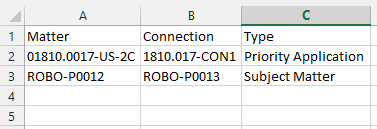
- All three columns are required and the syntax for the 'Type' column must be typed exactly as shown with the options file.
- Once you are finished, save the spreadsheet as a CSV file and not an XLS.
- Go to the Matters module.
- Click the Import CSV link in the upper right corner of the screen.

- From the Import window, click the Choose File button to locate your CSV for import.
- Choose the Add New Matters or Update Existing Matters option as needed.
- Click the Import button.

- AppColl then checks the spreadsheet for any errors. If AppColl finds any, you will be taken to a screen listing the errors.
- Once the import is complete, you should see a message indicating either success or describing any problems with the data.
- Repeat these steps until all connections are properly imported into AppColl and no errors are reported.
Matter Connections Import Template.csv